How to make your Christmas lights dance to music (tree included)
The short answer
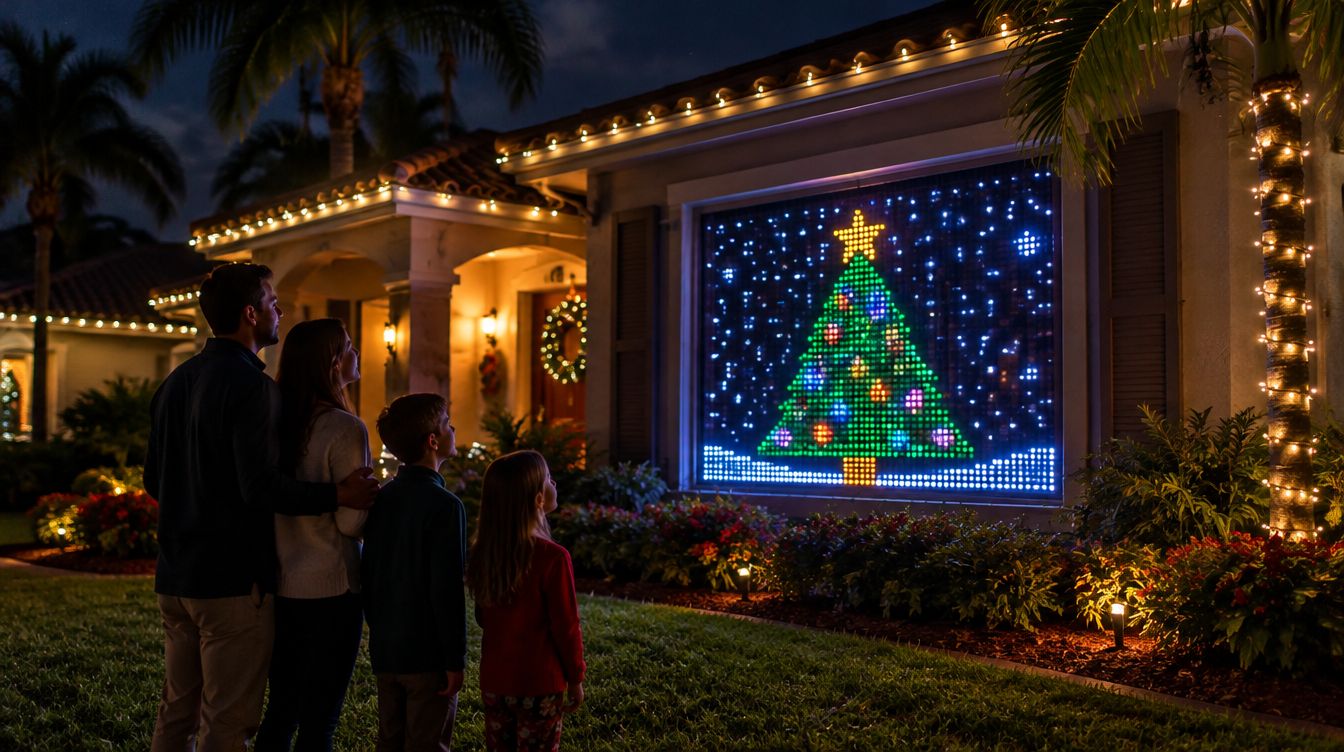
To make Christmas lights dance to music, use lights where each bulb can be its own color (pixel curtains or pixel strings), play the music on a computer, and let a music-reactive app run the show live. GlowBop does this on a Windows PC: it turns any supported string on your tree into a dancing tree with 22 tree animations, and the tree can join your curtain wall or play its own show. See Christmas tree mode.
What kind of Christmas lights can dance to music?
The lights that dance best are the ones where every bulb can be its own color. You will see them sold as pixel lights, smart curtains or addressable strings. A plain string that only does one color at a time can still flash on the beat, but it cannot draw a candy cane swirling up a tree or snow falling down a window.
A few things to check before you buy or hang anything:
- Each bulb its own color. Look for the words pixel, addressable or a bulb count on the box. That is what lets a show move across the lights instead of just blinking.
- Curtains for pictures. A curtain is a grid of pixels, so it can show a tree, a sleigh or snow. More curtains side by side make a bigger screen.
- Strings for the tree. A string wraps a real or fake tree and turns it into a light show of its own.
- Outdoor rating. If it goes on the porch or in the yard, check that it is rated for outside.
How should I wrap my tree so the lights look good?
How you wrap the string changes what the show can draw. There is no wrong way, but pick one and stick to it:
- Spiral. Start at the bottom (or the top) and wind round and round. Great for candy cane stripes and climbing spirals.
- Drops from the star. Run the string from the top down, back up, and down again, like the spokes of an umbrella. Great for light falling from the star.
- Zig-zag swags. Swing it side to side as you go down. Good on a skinny tree or a tree pinned flat on a wall.
Keep the controller box at the back or bottom, where you can reach the plug. And put the brightest bulb right under the star if you can, because a lot of tree animations peak at the top.
Where should the music play?
Pick one place for the music and keep it there. Many light apps listen through a microphone, which is fine in a quiet room but can react to people talking at a party. Others play along with a song on your phone. Read your light's own help pages to see how it works.
How GlowBop handles it
This is the part I get excited about. My own tree is a Nanoleaf string wrapped round it, and it sits next to my wall of Twinkly curtains. GlowBop runs the whole thing from a Windows laptop and listens to the music the laptop plays, so any app works: Spotify, YouTube, Apple Music, a playlist you made.
Christmas tree mode
On the HOLIDAY tab, you tell GlowBop how you wrapped your tree: spiral up or down, drops from the star, or zig-zag swags. You can also use the map you already made in the Twinkly app, or scan the tree with your phone camera. GlowBop blinks the top bulb, you nudge it until it is the real top, and every animation peaks right there.
Then the tree dances. There are 22 tree animations: spirals, candy canes, snow, a blazing star, a gift that unwraps into gold, a singing tree, Santa's sleigh, a toy train, fireworks, hot cocoa, frost that shatters on the drop, bubbles and more. When the beat drops, the tree strobes and bursts like a club wall. Ornament mode lets you tap where your ornaments hang so they glow and pop on the beat.
The tree joins the wall, or plays its own show
One switch decides it. On the wall, your tree dances with your curtains as one big show. Tell GlowBop how tall the tree is and it stands on the LIGHTS board at its true height. Drag it next to a curtain and it joins that show. Drag it away and it plays tree animations on its own, still to the music. The details are in the light groups guide.
Make it yours
- Your colors: Classic, Warm white, Candy cane, Frozen, Retro bulbs, Grinch, Rose gold, Rainbow, or up to five of your own.
- Your star: gold, white, red, rainbow or your colors, steady, twinkling or pulsing to the beat.
- Your message: type a greeting or the family name and it is written round the tree.
- Paint your tree: draw on it with your finger and your picture twinkles, turns or pulses with the music.
The rest of the Christmas show
Your curtains get the Christmas holiday show: a twinkling tree, candy canes, a sleigh ride and snow. On a wall of two or more curtains, the Christmas Eve mini-movie stretches across the whole wall: snow on the village, windows lighting up, a giant tree filling with ornaments, Santa's sleigh and presents bursting into fireworks. Play a Christmas song from mid-November to early January and the music show switches to the Christmas show by itself. It is all in the holidays guide.
When the party winds down, tap the fireplace and the wall becomes a fire: 9 styles, 9 colors, Cozy or Roaring, and flames that swell gently with the music if you want them to. It looks great on a living room wall, not just outside.
If you have Pro, Pro Home can turn the lights on at sunset and off at bedtime, and the holiday calendar is right there to switch the house into Christmas with one tap.
Which lights work today? Twinkly curtains and strings, Nanoleaf string lights and the LIFX String. Govee works as a one-color wash. The full list is on supported lights.
Try it
Open the live demo and play with the tree on a pretend wall, or start the 7-day free trial on the pricing page. GlowBop's public beta opens Oct 31, just in time to plan your Christmas show. Want text on the curtains too? Read how to put text and pictures on an LED curtain.
Questions people ask
How do I make my Christmas lights dance to music?
Use lights where every bulb can change color on its own, play the music on a computer, and use an app that reacts to the music live. GlowBop listens to what the computer plays and runs the show on your curtains, strings and tree.
Can a cheap string of lights become a dancing Christmas tree?
Yes, as long as it is a string GlowBop supports. Wrap it round the tree, show GlowBop how it goes round, and the tree plays its own light show to the music.
Can my Christmas tree and my curtain lights play one show together?
Yes. On the LIGHTS page, drag the tree next to a curtain and it becomes part of that show at its real height. Flip one switch and it plays its own tree show instead.
Do I need to sequence every Christmas song by hand?
No. GlowBop runs a live show that follows each song as it plays, with no sequencing. In season, a Christmas song switches the music show to the Christmas show by itself.
Can my lights do a fireplace on Christmas Eve?
Yes. One tap turns the whole wall into flames, with 9 fire styles, 9 colors and a Cozy or Roaring setting.